Furniture manufacturing has changed more in the last decade than in the previous fifty years, and the biggest shift isn’t a new blade or a faster motor — it’s software. Specifically, it’s how design files move from a designer’s screen straight to a CNC machine’s cutting head without a human redrawing, re-measuring, or re-keying anything in between. That handoff is what CAD/CAM integration actually means, and workshops that get it right cut lead times, reduce material waste, and eliminate an entire category of costly human error.
This guide breaks down what CAD/CAM integration actually does for a furniture manufacturing workflow, where it saves the most money, and how to think about adopting it if you’re still running a manual or semi-manual shop.
What CAD/CAM Integration Actually Means in Furniture Manufacturing
CAD (Computer-Aided Design) and CAM (Computer-Aided Manufacturing) are technically two different pieces of software, and for years they were used separately: a designer would build a piece in CAD software, then someone else would manually reinterpret those dimensions into toolpaths, feed rates, and cut sequences for the shop floor.
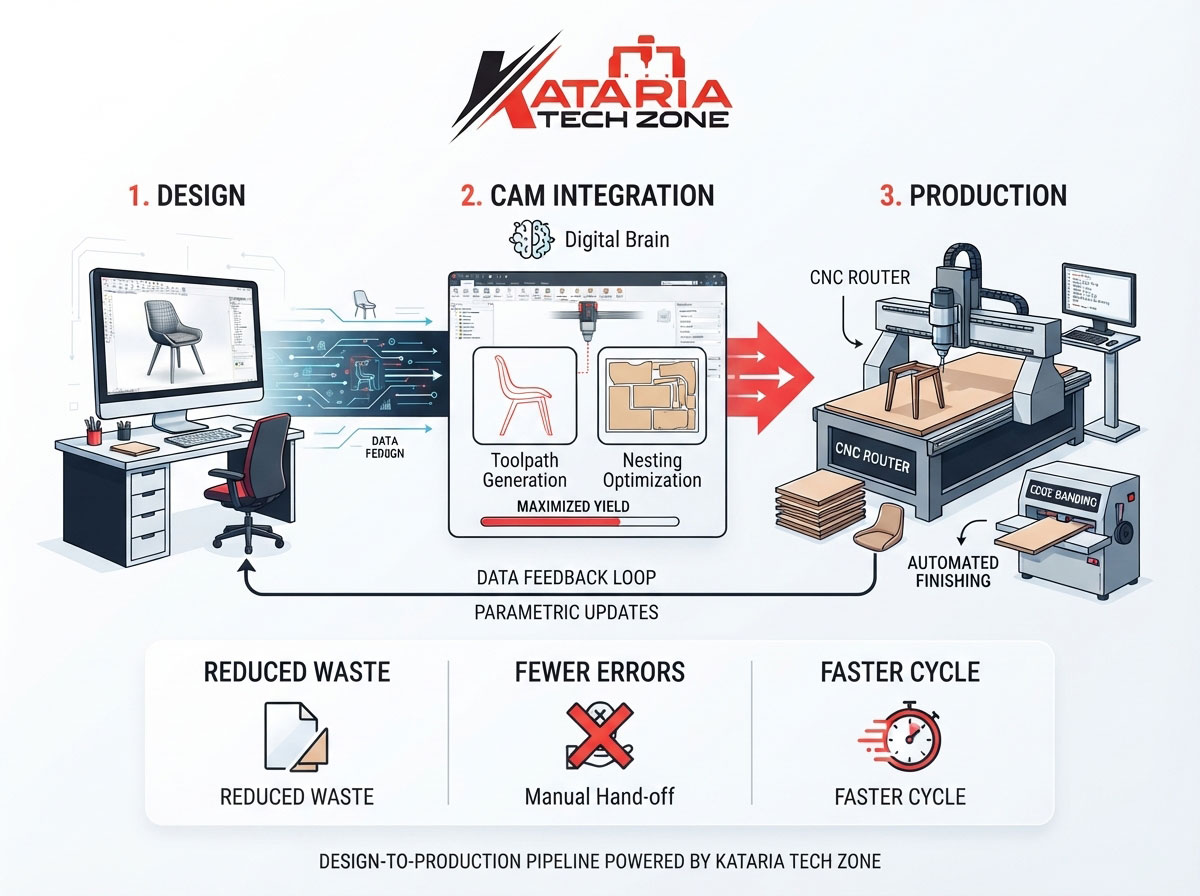
Integration means those two steps talk to each other directly. A design created in CAD software — a wardrobe carcass, a kitchen cabinet run, a chair frame — is exported in a format the CAM software (and ultimately the CNC machine) can read natively, generating toolpaths automatically instead of by hand. In a modern furniture workshop, this typically looks like:
- A designer builds the piece and its cut list in CAD software (often parametric, so dimensions update automatically if specs change).
- The file exports directly into CAM software, which generates toolpaths, nesting layouts, and machine-specific instructions.
- The CAM output is sent straight to the CNC router, panel saw, or edge banding line on the shop floor.
- The machine cuts, drills, or shapes the part exactly as designed — no manual re-measurement in between.
The result is a design-to-production pipeline with far fewer manual translation points, and every manual translation point is a place where errors, delays, and material waste creep in.
Why This Matters for Furniture Manufacturers Specifically
Furniture manufacturing has a few characteristics that make CAD/CAM integration especially valuable compared to other industries:
High part variety per project. A single wardrobe or kitchen order might involve dozens of unique panel sizes, hinge-boring positions, and joinery cuts. Manually transferring even one dimension incorrectly across dozens of parts is a real production risk — and it happens constantly in shops still working from printed cut lists.
Material cost sensitivity. Sheet goods like plywood, MDF, and particleboard are a major line item in furniture production. Nesting software inside a CAM pipeline automatically arranges parts on a sheet to minimize offcuts, something that’s nearly impossible to do as efficiently by eye.
Repeat and semi-custom orders. Furniture manufacturers frequently produce variations on a base design — different sizes, finishes, or configurations of the same core product. Parametric CAD models mean a size change updates every dependent dimension automatically, instead of requiring someone to redo the math for every panel.
Multi-machine production lines. A typical furniture workshop runs several machine types in sequence — a CNC router for panel cutting and shaping, a panel saw for initial breakdown, and an edge banding machine for finishing. CAD/CAM integration lets a single design file drive instructions for all of them, keeping every machine working from the same source data.
Where Furniture Workshops See the Biggest ROI
1. Reduced Material Waste Through Nesting Optimization
Nesting software automatically arranges cut parts across a sheet to minimize offcuts and maximize usable yield per panel. For a shop running a CNC router at volume, even a 5–8% improvement in material yield compounds into significant savings over a year of production, especially with higher-cost sheet materials.
2. Fewer Measurement and Transcription Errors
Every time a dimension is manually re-entered — from a design drawing to a cut list, from a cut list to a machine setting — there’s a chance for error. CAD/CAM integration removes those manual handoffs almost entirely, which is one of the most underrated benefits: it’s not just faster, it’s more accurate by design.
3. Faster Quoting and Design Iteration
Parametric CAD tools let a sales or design team adjust a customer’s specifications — a different cabinet width, an added shelf, a resized door — and see the updated cut list and material requirement instantly, which speeds up quoting and reduces back-and-forth before a job is confirmed.
4. Shorter Setup Time on the Shop Floor
Rather than an operator manually programming a machine or interpreting a paper drawing, CAM-generated toolpaths load directly into the machine control. This is particularly valuable on CNC routers and panel saws handling frequent job changeovers, where setup time between jobs can otherwise eat into productive machine hours.
5. Consistency Across Repeat Production Runs
Once a design is finalized in the CAD/CAM pipeline, it can be recalled and re-run identically at any time, which matters for furniture manufacturers fulfilling repeat orders for retailers, contractors, or dealer networks where consistency between batches is a quality requirement.
How CAD/CAM Fits Into a Real Furniture Production Workflow
To make this concrete, here’s how a typical order moves through a CAD/CAM-integrated furniture shop:
Step 1 — Design and specification. The design team builds the piece in CAD software, defining panel dimensions, joinery, hardware positions, and material specification.
Step 2 — Cut list and nesting generation. The CAM software (or an integrated module within the same platform) generates an optimized cut list, nesting the parts across standard sheet sizes to minimize waste.
Step 3 — Toolpath generation. CAM software converts the design geometry into specific toolpaths — cutting sequences, drill points for hinges and dowels, and edge profiles — tailored to the exact machine that will run the job.
Step 4 — Machine execution. The toolpath file loads onto the CNC router or panel saw, and the machine cuts the parts to spec without an operator re-measuring or re-programming anything manually.
Step 5 — Downstream processing. Cut panels move to edge banding, drilling, or assembly stations, often with the same design data informing hardware positions and edge-banding specifications.
Step 6 — Quality check and dispatch. Because every part was cut from the same verified digital source, quality checks are faster — deviations are easier to catch because the expected dimensions are known precisely, not estimated.
This is a meaningfully different workflow from a shop where a drawing is printed, measurements are read off by hand, and a machine operator sets up cuts manually for every job — and the difference shows up directly in lead time, waste, and rework rates.
What to Look for When Choosing CAD/CAM Software for a Furniture Workshop
Not every CAD/CAM package is built with furniture manufacturing in mind. When evaluating software for your workshop, prioritize:
- Furniture-specific libraries — pre-built joinery types, hardware databases (hinges, drawer slides, connectors), and panel-processing templates relevant to cabinetry and furniture, rather than generic CNC machining tools built for metalworking.
- Native nesting optimization — software that automatically nests parts across sheet stock, rather than requiring a separate nesting step.
- Machine compatibility — direct, tested compatibility with your specific CNC router, panel saw, and edge banding machine models, so toolpath output doesn’t need manual reformatting.
- Parametric design support — the ability to adjust one dimension and have dependent measurements update automatically across the whole design.
- Post-processor support — the software should generate machine code (G-code or equivalent) specific to your machine’s control system without manual editing.
If you’re currently running or evaluating a CNC router or CNC stone router for your production line, checking CAD/CAM software compatibility with that specific machine model before purchase will save significant setup headaches later.
Common Integration Mistakes Furniture Manufacturers Make
Buying software before evaluating the machine fleet. CAD/CAM software needs to output toolpaths your specific machines can actually run. Mismatched post-processors are one of the most common (and most frustrating) integration failures.
Skipping operator training on the software side. A lot of shops invest in the machine and the software but under-invest in training design staff to use parametric and nesting features properly, leaving significant efficiency gains unused.
Treating it as a one-time setup. CAD/CAM libraries (hardware, joinery templates, material specs) need ongoing maintenance as product lines evolve — a library that isn’t kept current slowly becomes less useful over time.
Ignoring the data flow to downstream machines. Integration shouldn’t stop at the CNC router. The same design data can and should inform edge banding, drilling, and even packaging specifications if the software and machines support it.
Getting Started: A Practical Path for Workshops Still Working Manually
If your workshop is currently working from paper drawings or manually operated machines, a full CAD/CAM overhaul doesn’t need to happen in one step:
- Start with your highest-volume, highest-error product line — the product where repeat measurement errors or material waste is costing you the most, and integrate that workflow first.
- Confirm machine compatibility before committing to software — check that your CNC router, panel saw, and edge banding equipment can accept the toolpath formats the software generates.
- Digitize your cut lists and hardware specs even before full automation — this alone reduces transcription errors.
- Train design staff on parametric modeling so future design changes update automatically rather than requiring manual rework.
- Expand machine-by-machine — bring your CNC router online first, then extend the same design data to panel saws and edge banders as the pipeline matures.
For workshops evaluating new machinery as part of this shift, it’s worth reading our related guides on Getting Started with CNC Routers for Woodworking: A Beginner’s Guide and CNC Router vs. Traditional Woodworking Tools: Speed, Precision, and Cost Comparison, both of which cover how CNC-based production compares to manual methods in more depth.
Final Thoughts
CAD/CAM integration isn’t a luxury reserved for large furniture manufacturers — it’s increasingly the baseline expectation for any workshop trying to compete on lead time, consistency, and material cost. The workshops seeing the biggest gains aren’t necessarily the ones with the newest machines; they’re the ones where design data flows cleanly from the drawing board to the cutting floor without manual re-entry at every step.
At Kataria Tech Zone, we manufacture CNC routers, CNC stone routers, and supporting woodworking machinery built to integrate cleanly with modern CAD/CAM workflows, so your design software and your shop floor stay in sync. Explore our full machine range in our shop, or browse our CNC router category and CNC stone router category to find the right fit for your production line. For more workshop efficiency guides, visit our blog.